AI operating layer for Shopify brands running paid acquisition

Know what to scale, fix, and prioritize across Shopify, Google Ads, and Meta.

Magicad combines Shopify performance, paid media data, and Market Context into one operating workspace for ecommerce teams that need faster commercial decisions.

  • See what products or campaigns deserve more budget
  • Spot what to fix before wasted spend compounds
  • Prioritize channels, products, and timing with Market Context behind the recommendation

Continue with Google or use a secure magic link. No credit card. Your 14-day trial starts when the first successful sync completes.

AI Advisor

Budget is drifting to low ROAS campaigns.

Shift 12% of spend from Prospecting to Retargeting to recover margin.

Confidence Very high 86%

How sure the advisor is that this action improves ROAS.

Revenue

$128,430

Last 30 days

ROAS

3.9x

Up 14%

Actions

5

Prioritized

Context

Ready

Market Context

Why Magicad

Everything a Shopify growth team needs to go from data to action.

Built for Shopify brands that want one operating loop from live data to actions without spreadsheet handoffs.

Self-serve setup

Create a workspace, connect the sources that matter, and let Magicad guide the first sync and setup checklist.

Market Context before recommendations

Build one strategic dossier up front so both AI advisors understand positioning, seasonality, and commercial constraints.

Two AI advisors, one workspace

Run Shopify AI Advisor and Ads AI Advisor from the same normalized workspace without spreadsheet handoffs.

Product tour

See the platform in action.

One intelligence layer fed by Shopify, Google Ads, and Meta, followed by the current product screens that already exist in the live app.

Decision engine

Shopify, Google Ads, and Meta become business recommendations with AI.

Magicad fuses commerce signals, paid media performance, and Market Context before it generates any recommendation. The output is operational: what to push harder, where to reallocate spend, and when to hold back.

Priority Confidence Evidence-backed Market Context

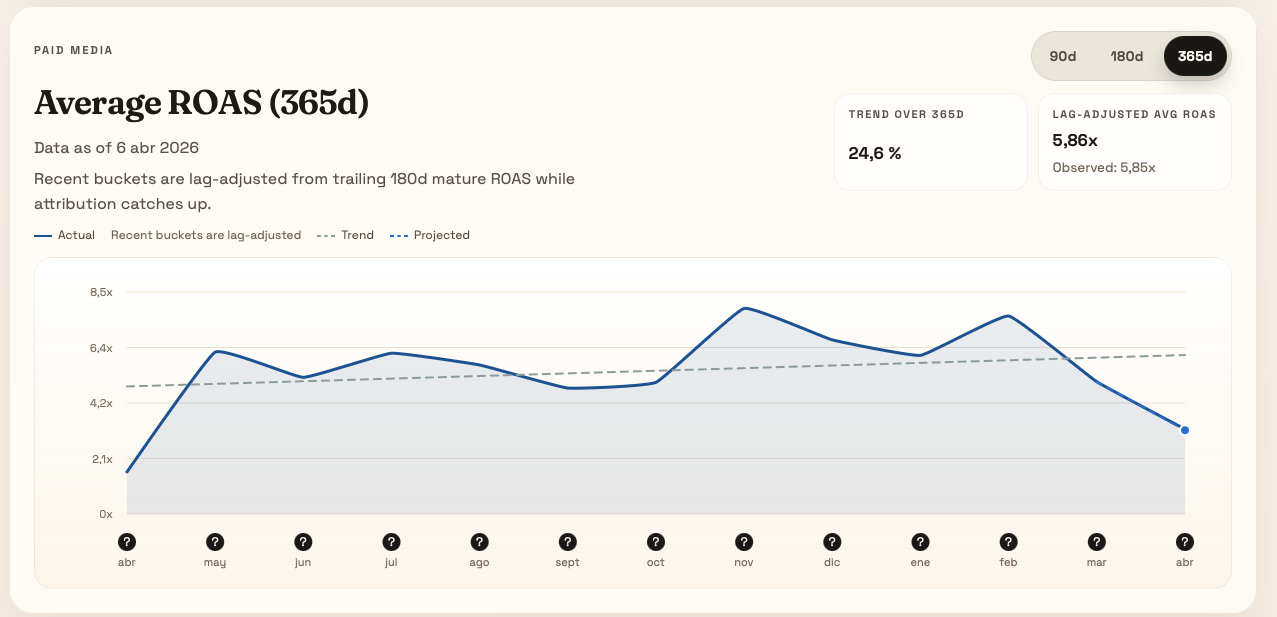
Ads AI Advisor screen from the live product showing the average ROAS view.

Ads AI Advisor

Paid media decisions with live ROAS context.

This is the current Ads AI Advisor surface: lag-adjusted ROAS, trend direction, and a clearer read on recent performance before the team changes spend.

Real product screen Lag-adjusted ROAS Trend visibility
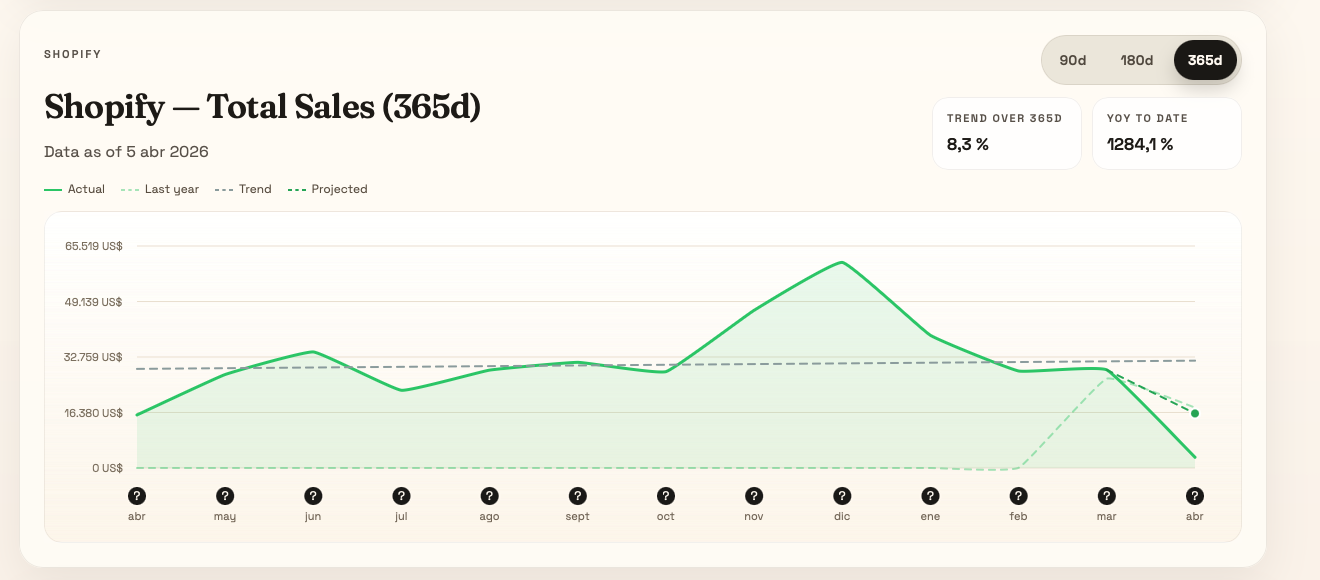
Shopify AI Advisor screen from the live product showing the total sales view.

Shopify AI Advisor

Shopify performance shown as it exists today.

The current Shopify advisor surfaces sales evolution, year-over-year context, and the commercial rhythm behind merchandising and product decisions.

Real product screen Sales evolution YoY context

How it works

Set up once. Keep decisions flowing.

Magicad handles the setup path in a simple order so your team gets to reliable recommendations quickly.

01

Connect the sources you actually use

Connect Shopify plus Google Ads or Meta Ads with secure OAuth flows. You do not need every source to start.

02

Run the first sync

Magicad lands the first dataset, starts the 14-day trial, and checks whether each advisor has enough evidence.

03

Build Market Context, then open the advisors

Complete Market Context once, then unlock Shopify AI Advisor and Ads AI Advisor when the data gates are ready.

Start free

Launch a workspace in three steps.

Magicad is open for self-serve access. Create an account, create a workspace, and connect the first source to begin the 14-day free trial.

01

Create your account

Start with a secure magic link. No password, no card, and no charge approval required to create your account.

02

Create your workspace

Name the workspace, set timezone and currency, and let Magicad prepare the setup checklist.

03

Connect Shopify and your first ads source

The first successful sync starts the trial. Billing is only approved later in Shopify if you want to continue.

What you get on day one

Magicad is built for Shopify brands that want a working operating loop from live data to recommendations.

  • Shopify AI Advisor for products, stock risk, and merchandising priorities
  • Ads AI Advisor for spend allocation, campaign fixes, and performance readouts
  • Market Context to anchor recommendations in positioning and seasonality
  • Workspace-level setup gates so recommendations only unlock with enough data and context

Shopify is required for the commercial billing path. One Shopify store runs inside each workspace today.

14-day free trial

Start now, approve billing later in Shopify.

Create your account now. The trial starts on the first successful sync, and you only approve a paid plan in Shopify if you decide to continue.

Connections

Connect the sources that drive revenue.

Built-in connectors with secure tokens and workspace-level isolation.

Shopify
Meta Ads
Google Ads

Pricing

Clear plans for growing teams.

One Shopify store per workspace, clear seat limits, and Shopify-managed billing after the trial.

Starter

$149/month

  • Daily data sync
  • 1 user
  • Shopify AI Advisor + Ads AI Advisor
  • 14-day free trial
Start with Google

Trial starts when your first successful data sync completes. Billing is approved later in Shopify if you continue.

Privacy first

Built for marketing teams, with enterprise-grade privacy.

Each workspace is isolated. Tokens are encrypted. Your data stays yours.

Workspace isolation

Every client has separate access controls to keep data private and secure.

Encrypted connections

Sensitive credentials are encrypted at rest and never shared across teams.

FAQ

Answers for fast-moving teams.

How long does onboarding take?

Most teams can create a workspace and connect the first source in minutes. Recommendations unlock once enough data lands and Market Context is complete.

Do I need a Shopify store?

Yes. Shopify is required for the commercial billing path and for Shopify AI Advisor, even if you only plan to start with ads data.

When does the free trial start?

The 14-day free trial starts when the first successful sync completes. Creating an account and workspace does not trigger a charge or start billing.

Can I manage multiple stores?

Today Magicad supports one Shopify store per workspace, so each brand or store should live in its own workspace.

Ready to improve ROAS?

Start free, connect the first source, and let Magicad unlock the setup path toward Shopify AI Advisor and Ads AI Advisor.